

Table of Contents
Introduction to SolidWorks 2018 With License Key
Solidworks, as we all know its one of the great software that the mechanical and automobile industry mostly uses.
Many people use it for their educational use or professional use to create certain parts, models, assembly, drafting, analysis sheet metals, wire-frames, etc.
So this article would explain to you how to install SolidWorks 2018 with License Key (Crack).
So, Once you are ready with the SolidWorks 2018 – With License Key setup file, kindly follow the below set of procedures to install the software avoiding any sorts of error.
To download the setup file, kindly mail us at info@scienceclear.com.
Note:- The Installation and all the instruction provided, is only for educational use only !! Also, follow the step by step procedures to avoid any sorts of errors.
Step by Step Process to Install Solidworks 2018 – Crack
- First of all, Log in to your administrator system where you have full rights to your computer.
- If you are currently using any anti-virus, or anti-malware, anti-spyware, or anything such, kindly disable it till the installation process is completed.
Note:- 2015 versions and above can only be installed in a 64-bit system. So kindly ensure that you have your windows 64 bit installed.
- Now Download the software from the third party website. If you are unable to find where to download the, kindly drop us a mail on “info@scienceclear.com“.
- Once the SolidWorks 2018 or higher version is downloaded, you are now ready for the installation process.
- Extract the SolidWorks 2018 version of the software with PowerISO or WinRAR and install the software. Once extracted, it would look like below:
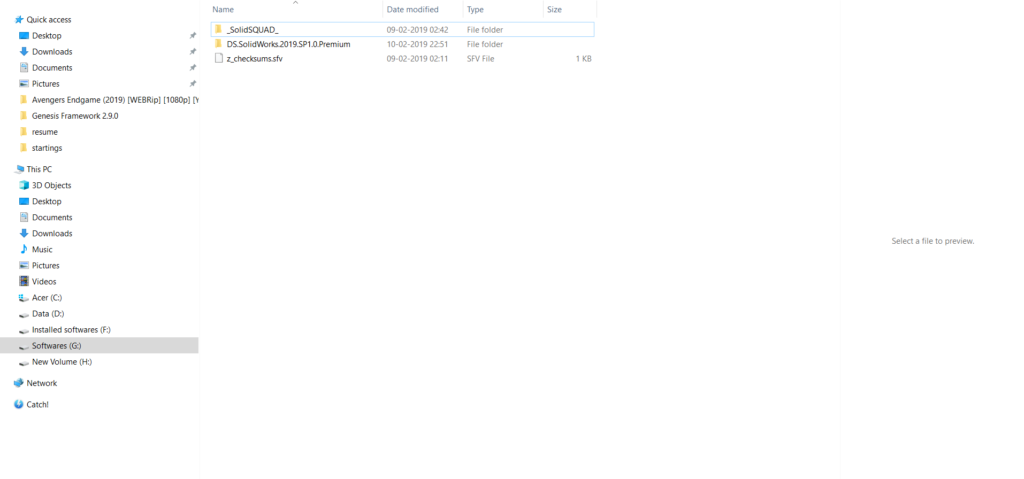
- Open the folder “_SolidSQUAD_ and there in you will find the file SolidWorks.Activator.SSQ “. Open this file via “Run as Administrator“.

- Now, click on the “Change Serial Numbers” button, select the ” Force Local Activation Serial Numbers” from the drop-down list and then click on “Change Serial Numbers“.

- Now, click on the “Activate Licenses” button, now select the “SolidWorks 2018 Products” from the drop-down list, select products to activate by clicking on “Activate” or “Skip” on every product and “Details” to tweak features if required. Click on “Activate Licenses” to activate licenses. SolidWorks PDM Professional license will be also generated and will ask you to save on disk as “sw_d.lic”. Kindly save and Close the Activator Window.
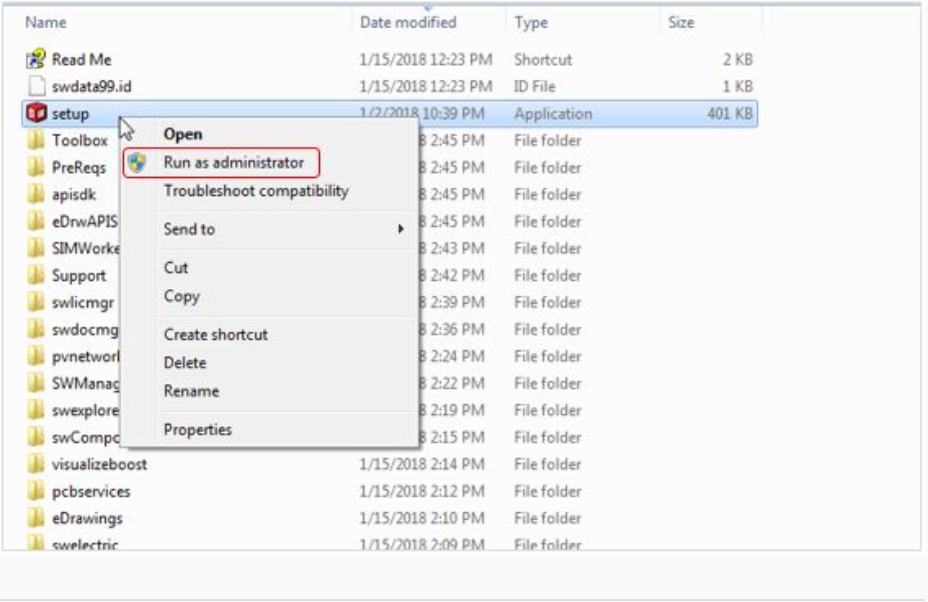
- Now, go back to the setup file and right-click on the setup.exe file and select ” Run as Administrator” as shown below.
- The installation manager would popup. Under the Welcome tab, you need to select the ” Individual (on this computer) ” and click on Next.

Note: Don’t install the SolidNetwork License Server (SNL).
- Once you click on Next from the welcome tab, you will notice that the next tab automatically comes up i.e Serial Number’s Tab. You will notice that for each of them, your serial numbers are already filled into it. You can un-check for all the packages you don’t require.
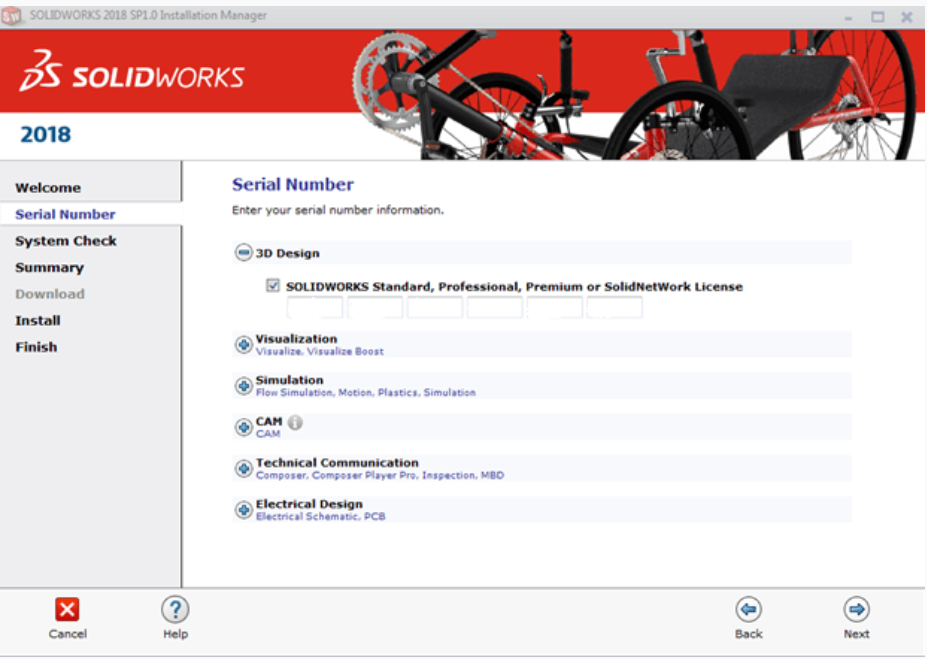
- Click on Next, and you will be landed under the Summary tab. In this tab, you need to select the folder you need to install the software. By default, it would take your C: Drive i.e the drive where your windows are installed.

Recommended SSD configuration for your laptop
It is advised to choose the location where your Solid State drive is installed (only if you have SSD in your laptop) as it would make your software to run faster. If you don’t have the SSD in your laptop, you can purchase it: Click Here to Purchase with the discounted Price or click on the below image to purchase

- Click on “I accept the terms of the SOLIDWORKS” and then click on Install Now.

- After you click on Install Now, your download process will start. Kindly wait for the download process to complete.
- Upon completion of the installation, click on “Remind me Later” and then click on Finish.
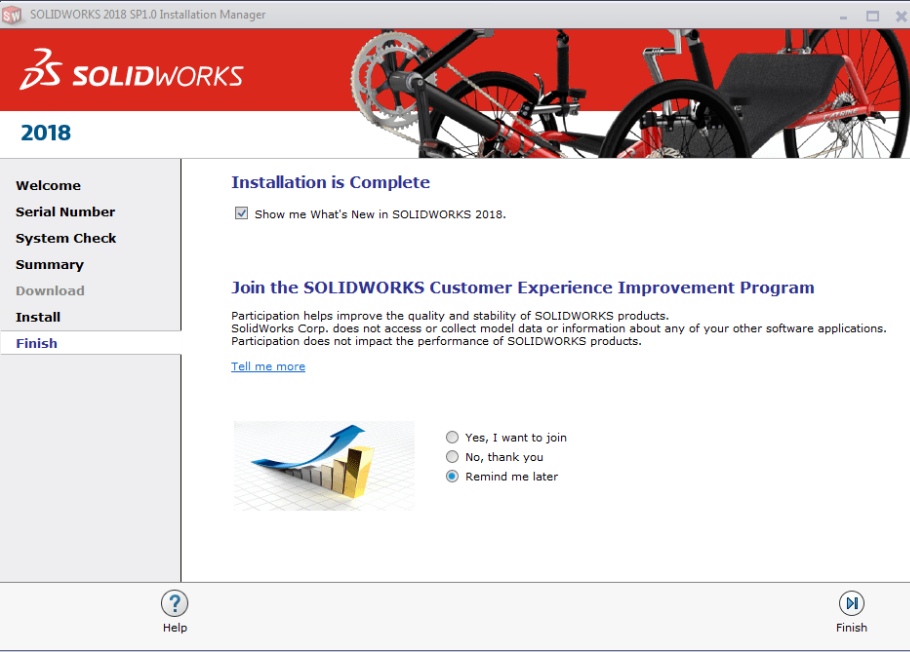
- Restart the workstation after the installation and open the Solidworks installed on your system.
- Now you are ready to move and create your first part in SOLIDWORKS 2018 or higher.
Solidworks 2018 – License Key – Higher System Requirements:
Essential Operating Systems:
- Windows-10, 64-Bit
- Windows-8.1, 64-Bit
- Windows-8.0, 64-Bit
- Windows-7-SP1, 64-Bit
- Windows-7-SP1, 32-Bit
RAM Requirement:
- 64 bit: 8 GB, or more – recommended for large assembly work and Simulation. (Though 4GB will also work, the system would be too slow)
- Its Strictly advised incorporating SSD in your laptop if you don’t have any. You can purchase the SSD from here.
Click Here to Purchase with the discounted Price or click on the below image to purchase